# Load libraries
library(tidyverse)

# Import data
mn <- read_csv("data/mn-colleges.csv")6 More Colors with RGB and HEX
In the previous chapters, you learned how to add color to a plot using names that R recognizes (e.g., maroon, black). While there are many color names that R recognizes, there are many times that you want to use a more specific color in your data visualization for aesthetic reasons or branding. For example, suppose we were creating a data visualization for the University of Minnesota. The color name “maroon” (■) is not the official maroon of the university (■). In this chapter, you will learn how color is interpreted by computers and how we can use the RGB color model and HEX notation to express up to 16 million different colors.
6.1 The Human Eye and Color Perception
In 1704, Newton (1704) suggested that objects don’t possess color, rather they reflect or absorb different wavelengths of light. The human eye detects only the reflected wavelengths of light which is perceived as color. When light enters your eye and hits your retina, it activates the millions of rods and cones which are the tiny biological translators (photoreceptor cells) that convert light into electrical signals for the brain. The cones are what get activated that allow us to perceive color.
There are three distinct types of cones in our eyeballs, and each is sensitive to the long, medium or short wavelengths of light.1 (Many times they are referred to as long, medium, and short cones for this reason.)
- Long cones: Most sensitive to the wavelengths that we perceive as red.
- Medium cones: Most sensitive to the wavelengths that we perceive as green.
- Short cones: Most sensitive to the wavelengths that we perceive as blue.
Of course we see more colors than just red, green, and blue. When light hits the retina, it activates more than one type of cone, but often in different ratios. For example, when we see the color yellow, the light reflecting off an object is activating more of the long and medium cones than the short cones. This mixing allows most humans to perceive millions of colors. Human’s ability to perceive the entire spectrum of colors from the mixing just three primary signals is called the Trichromacy Theory (also known as the Young-Helmholtz Theory).2 This theory is the basis behind many of the models to create color on a computer.
6.2 The RGB Color Model
The RGB (red-green-blue) color model is one of the most common models for producing color on electronic screens (e.g., computers, TVs). To create a color, a red light beam, a green light beam, and a blue light beam (components) are superimposed on one another. Each component can have an intensity from 0 (none of the component light) to 255 (full intensity of that component light). By combining varying intensities of each red, green, and blue component we can create many different colors.3 In fact, since there are 256 possibilities for each component and there are three components, there are about 16.7 million potential colors we can create with this model:
\[ \begin{split} \mathrm{Total~number~of~colors} &= 256 \times 256 \times 256 \\[2ex] &= 16,777,216 \end{split} \]
In practice, when we use this model all we need to do is specify the intensity of each of the three components using a value from 0–255. For example, to specify the color red we would use:
\[ \begin{split} \mathrm{R} &= 255 \\ \mathrm{G} &= 0 \\ \mathrm{B} &= 0 \end{split} \]
Instead of listing these out like this, we often provide the intensities for the three components as an ordered triple:
\[ \mathrm{Red} = (255,~0,~0) \]
Here are the RGB specifications for some other common colors:
\[ \begin{split} \mathrm{Red} &= (255,~0,~0) \\ \mathrm{Green} &= (0,~255,~0) \\ \mathrm{Blue} &= (0,~0,~255)\\ \mathrm{Cyan} &= (0,~255,~255)\\ \mathrm{Magenta} &= (255,~0,~255)\\ \mathrm{Yellow} &= (255,~255,~0)\\ \mathrm{Black} &= (0,~0,~0) \\ \mathrm{White} &= (255,~255,~255)\\ \end{split} \] In the RGB model, red, green, and blue are called primary colors because they have full intensity of one component and no intensity of the other components. The secondary colors are cyan, magenta, and yellow because they are created by combining two of the primary colors. White is the combination of all three primary colors, and black is the absence of all three primary colors.
You can add intensity values to each component in the RGB Color Generator below to see what colors are produced.
6.3 Expressing RGB Color in Binary Values
When a computer goes to represent an RGB color it converts the intensity values to a binary value (i.e., Base 2). A binary number is only composed of 0s and 1s. Each digit in a binary number is called a “bit” (binary unit) and to represent values from 0 to 255 we need 8 digits or 8 bits. For example, the value 0 in binary is 00000000 and the value 255 in binary is 11111111. To represent a color a computer processes a 24-bit string that looks like this: 11111111 01010111 00110011. This is equivalent to the RGB color (255, 87, 51).
6.3.1 Converting Binary to Base-10
The number we know as 253 is a three digit number in base-10. In representing 253, you might have learned about the ones, tens and hundreds place in the number—the 2 is in the hundreds place, the 5 is in the tens place, and the 3 is in the ones place. We can also represent these “places” using the powers of 10:
- Ones place is \(10^0\)
- Tens place is \(10^1\)
- Hundreds place is \(10^2\)
If you think about a number that has a thousands place, this is just \(10^4\). Going back to our number 251, this is telling us that we have two \(10^2\)s, five \(10^1\)s, and three \(10^0\)s. Mathematically, we can express this as:
\[ 253 = (2 \times 10^2) + (5 \times 10^1) + (3 \times 10^0) \]
Thinking about the “places” in a number as powers helps us generalize to more than just base-10. For example, to write a number in base-2, now it is not powers of 10 in the “places”, but powers of 2. Looking at the three bit number 101, this is:
\[ \begin{split} 101 &= (1 \times 2^2) + (0 \times 2^1) + (1 \times 2^0) \\ &= 4 + 2 + 1 \\ &= 7 \end{split} \]
So 101 in base-2 is equivalent to 7 in base-10. For our colors, recall that we have an 8-bit string to represent each channel. So in the color 11111111 01010111 00110011, the first channel (R) is 11111111. Translating this to base-10:
\[ \begin{split} 11111111 &= (1 \times 2^7) + (1 \times 2^6) + (1 \times 2^5) + (1 \times 2^4) + (1 \times 2^3) + \\ &~~~~~(1 \times 2^2) + (1 \times 2^1) + (1 \times 2^0) \\ &= 128 + 64 + 32 + 16 + 8 + 4 + 2 + 1 \\ &= 255 \end{split} \]
The second channel (G) is 01010111, which translated to base-10 is:
\[ \begin{split} 01010111 &= (0 \times 2^7) + (1 \times 2^6) + (0 \times 2^5) + (1 \times 2^4) + (0 \times 2^3) +\\ &~~~~~(1 \times 2^2) + (1 \times 2^1) + (1 \times 2^0) \\ &= 0 + 64 + 0 + 16 + 0 + 4 + 2 + 1 \\ &= 87 \end{split} \]
Finally, the third channel (B) is 00110011, which translated to base-10 is:
\[ \begin{split} 00110011 &= (0 \times 2^7) + (0 \times 2^6) + (1 \times 2^5) + (1 \times 2^4) + (0 \times 2^3) +\\ &~~~~~(0 \times 2^2) + (1 \times 2^1) + (1 \times 2^0) \\ &= 0 + 0 + 32 + 16 + 0 + 0 + 2 + 1 \\ &= 51 \end{split} \]
6.3.2 Converting Base-10 to Binary
Now that we know how to translate base-2 to base-10, how can we translate base-10 to base-2? For example, what is the binary 8-bit representation of the base-10 RGB color of (42, 111, 75)? To figure this out we need to take each channel of the RGB color and determine the values for each of the question marks in the following:
\[ \begin{split} \mathrm{Channel~Value} = &(? \times 2^7) + (? \times 2^6) + (? \times 2^5) + (? \times 2^4) + (? \times 2^3) +\\ &(? \times 2^2) + (? \times 2^1) + (? \times 2^0) \end{split} \]
For example, for the R channel:
\[ \begin{split} 42 = &(? \times 2^7) + (? \times 2^6) + (? \times 2^5) + (? \times 2^4) + (? \times 2^3) +\\ &(? \times 2^2) + (? \times 2^1) + (? \times 2^0) \end{split} \] It is easier to do this once we compute the powers of 2 in this mathematical statement.
\[ \begin{split} 42 = &(? \times 128) + (? \times 64) + (? \times 32) + (? \times 16) + (? \times 8) + \\ &(? \times 4) + (? \times 2) + (? \times 1) \end{split} \] Finally, before we figure this out, we need to keep in mind that every digit in a base-2 number can only be a 0 or 1. (This is different from a base-10 number, where every digit can be 0–9.) Filling in each question mark with either a 0 or 1, how do we make it so the overall sum is 42?
\[ \begin{split} 42 = &(0 \times 128) + (0 \times 64) + (1 \times 32) + (0 \times 16) + (1 \times 8) +\\ &(0 \times 4) + (1 \times 2) + (0 \times 1) \end{split} \] The 8-bit binary number that is equivalent to 42 is 00101010. Now to solve for the G channel:
\[ \begin{split} 111 &= (? \times 2^7) + (? \times 2^6) + (? \times 2^5) + (? \times 2^4) + (? \times 2^3) +\\ &~~~~~(? \times 2^2) + (? \times 2^1) + (? \times 2^0) \\[1ex] &= (? \times 128) + (? \times 64) + (? \times 32) + (? \times 16) + (? \times 8) +\\ &~~~~~(? \times 4) + (? \times 2) + (? \times 1) \\[1ex] &= (0 \times 128) + (1 \times 64) + (1 \times 32) + (0 \times 16) + (1 \times 8) +\\ &~~~~~(1 \times 4) + (1 \times 2) + (1 \times 1) \end{split} \]
The 8-bit binary number that is equivalent to 111 is 01101111. Finally, we solve for the B channel:
\[ \begin{split} 75 &= (? \times 2^7) + (? \times 2^6) + (? \times 2^5) + (? \times 2^4) + (? \times 2^3) +\\ &~~~~~(? \times 2^2) + (? \times 2^1) + (? \times 2^0) \\[1ex] &= (? \times 128) + (? \times 64) + (? \times 32) + (? \times 16) + (? \times 8) +\\ &~~~~~(? \times 4) + (? \times 2) + (? \times 1) \\[1ex] &= (0 \times 128) + (1 \times 64) + (0 \times 32) + (0 \times 16) + (1 \times 8) +\\ &~~~~~(0 \times 4) + (1 \times 2) + (1 \times 1) \end{split} \]
The 8-bit binary number that is equivalent to 75 is 01001011. So the binary equivalent of the RGB color (42, 111, 75) is 01101111 01101111 01001011.
FUN FACT
Computers store information in their memory in 8-bit units. Each 8-bit unit is called a byte. Each color channel takes up one byte in memory. Today’s computers have memories that are generally 16 GB or 16 gigabytes. A gigabyte has 125 million bytes, so taking up three bytes out of the two-billion bytes in a modern computer’s memory is trivial!
6.4 Hexadecimal Notation: Base-16
Although binary is what computers use, it is rather difficult for humans to write in binary. Think about how easy it would be to make a mistake in writing out the 24-bit string for a color! Instead early computer scientists took advantage of different bases to express information which was both easier for humans, but could be translated easily into binary. They settled on base-16, or hexadecimal.
Base-16 numbers use powers of 16 for each digit. One nice property for expressing color is that to express each channel we only need two digits! That is because \(16^2 = 256\)—which is how many values we have from 0 to 255. For an RGB color, we only need to express six values! This is far easier than using binary which would take 24—humans are far less likely to make a mistake with only six values. For example, the official primary maroon color for the University of Minnesota is: #7A0019.
The hashtag is used to indicate that the color value is in hexadecimal (base-16) notation. When we read a color in hexadecimal notation, the first two values are the red channel, the second two values are the green channel, and the last two values are the blue channel; #RRGGBB. In our example:
- R = 7A
- G = 00
- B = 19
Wait…there’s an A in the red channel’s number?! Yes. Hexadecimal numbers can have letters in them. This is because each digit in a base-16 number can take a value from 0–15. Unfortunately, the values from 10 to 15 are all two digits long so we need to use different entities to indicate these values. Because of this we replace the two digit possbilities with letters so that the values for each digit in a base-16 numer can be: 0–9, and A–F, where,
- A = 10
- B = 11
- C = 12
- D = 13
- E = 14
- F = 15
6.4.1 Converting Hexadecimal to Base-10
In converting a base-16 to base-10 value, we use the same idea as we did for base-2; only we will use the base of 16 in our conversion. As an example consider the red channel in our UMN maroon: 7A. To convert this to base-10 we use:
\[ \begin{split} 7\mathrm{A} &= (7 \times 16^1) + (\mathrm{A} \times 16^0) \\[1ex] &= (7 \times 16^1) + (10 \times 16^0) \\[1ex] &= 112 + 14 \\[1ex] &= 126 \end{split} \]
For the green channel:
\[ \begin{split} 00 &= (0 \times 16^1) + (0 \times 16^0) \\[1ex] &= 0 + 0 \\[1ex] &= 0 \end{split} \]
And for the blue channel:
\[ \begin{split} 19 &= (1 \times 16^1) + (9 \times 16^0) \\[1ex] &= 16 + 9 \\[1ex] &= 25 \end{split} \]
So the maroon expressed as #7A0019 can be expressed as an RGB color of (126, 0, 25). Check this in the RGB Color Mixer above to see the result.
6.4.2 Converting Base-10 to Hexadecimal
We will use the same process for translating base-10 to base-16 that we did when we translated base-10 to base-2. We take each channel of the RGB color and determine the values for each of the question marks in the following:
\[ \mathrm{Channel~Value} = (? \times 16^1) + (? \times 16^0) \]
For example, say we wanted to get the hexadecimal notation for the RGB color (255, 183, 30). To translate the R channel:
\[ \begin{split} 255 &= (? \times 16^1) + (? \times 16^0) \\[1ex] &= (? \times 16) + (? \times 1) \\[1ex] &= (15 \times 16) + (15 \times 1) \\[1ex] &= \textrm{FF} \end{split} \] For the G channel:
\[ \begin{split} 183 &= (? \times 16^1) + (? \times 16^0) \\[1ex] &= (? \times 16) + (? \times 1) \\[1ex] &= (11 \times 16) + (7 \times 1) \\[1ex] &= \textrm{B7} \end{split} \] Finally, for the B channel:
\[ \begin{split} 30 &= (? \times 16^1) + (? \times 16^0) \\[1ex] &= (? \times 16) + (? \times 1) \\[1ex] &= (1 \times 16) + (14 \times 1) \\[1ex] &= \textrm{1E} \end{split} \]
So the hexadecimal notation for the RGB color (255, 183, 30) is #FFB71E.
PROTIP
There are many online converters for translating between RGB and HEX. While you will need to be able to show the mathematics of how you translate between different bases, you can check your work with these converters.
6.5 Using HEX Colors in R
To illustrate how to use HEX colors in our data visualizations, we will work with the mn-colleges.csv data. In the first code chunk of your QMD document, load the {tidyverse} library and use the read_csv() function to import the mn-colleges.csv data and assign the data into an object called mn. (You also might want to view the data to ensure that it imported into the QMD correctly.) Don’t forget to add code comments as well!
We will create a histogram of the acceptance rates using the geom_histogram() function in a new code chunk in the QMD document. Inside the code chunk we will add the following syntax:
ggplot(data = mn, aes(x = accept_rate)) +
  geom_histogram()
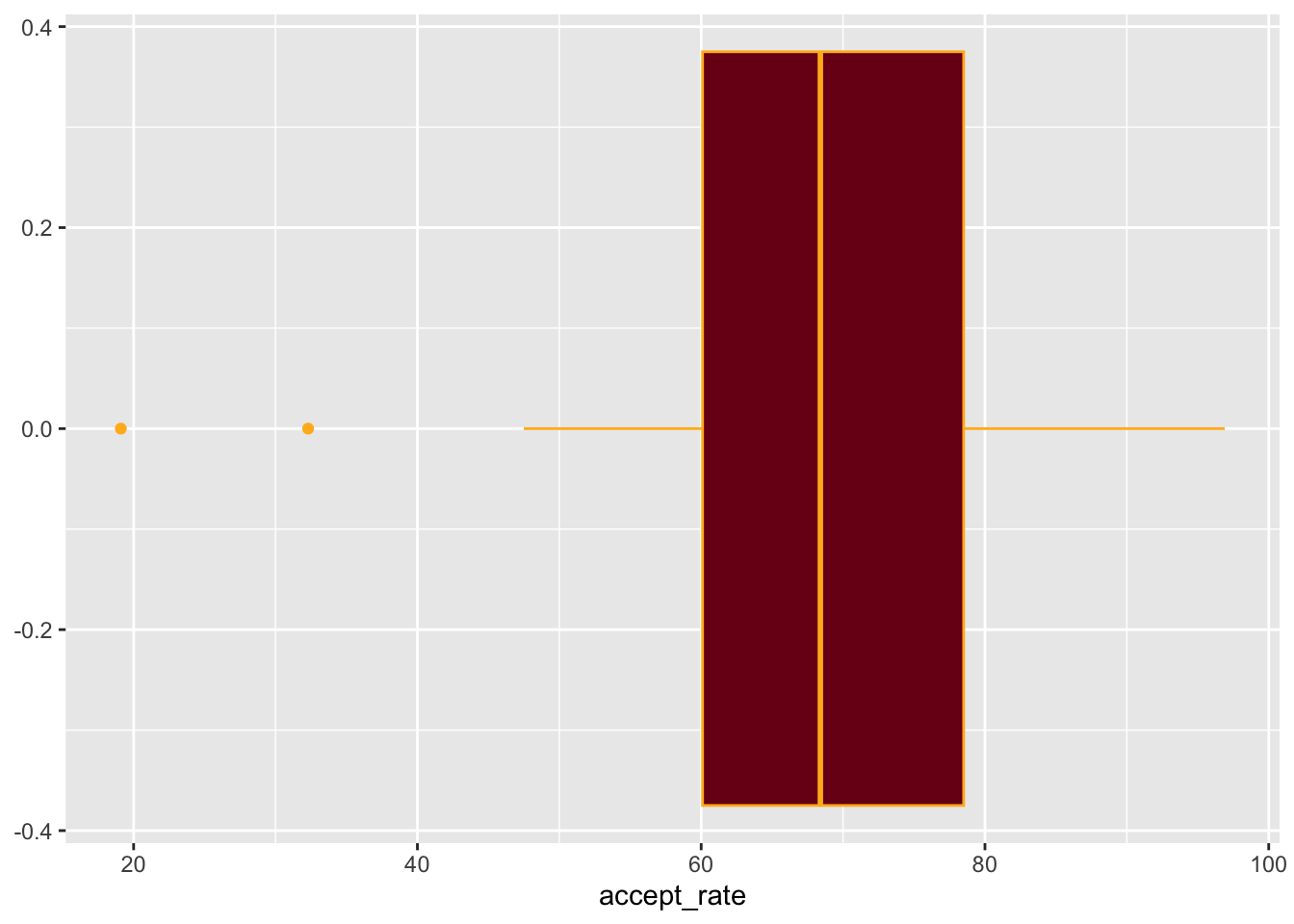
We can use HEX colors in the color= and fill= arguments. Similar to the color names we used, the HEX codes need to be enclosed in quotation marks. We also need to include the hashtag (#) to inform R that the color is in HEX notation. For example, to color the interior of our boxplot using the primary UMN maroon (#7A0019) and the border using the secondary dark gold (#FFB71E), we use:
ggplot(data = mn, aes(x = accept_rate)) +
  geom_histogram(
    color = "#FFB71E",
    fill = "#7A0019"
  )
Exercises: Your Turn
- The primary gold color of the University of Minnesota has an RGB notation of (255, 204, 51). Convert this to binary notation. Show your work.
- The primary gold color of the University of Minnesota has an RGB notation of (255, 204, 51). Convert this to HEX notation. Show your work.
- The HEX notation for the University of Minnesota’s secondary light gold is #FFB71E. Convert this to RGB notation. Show your work.
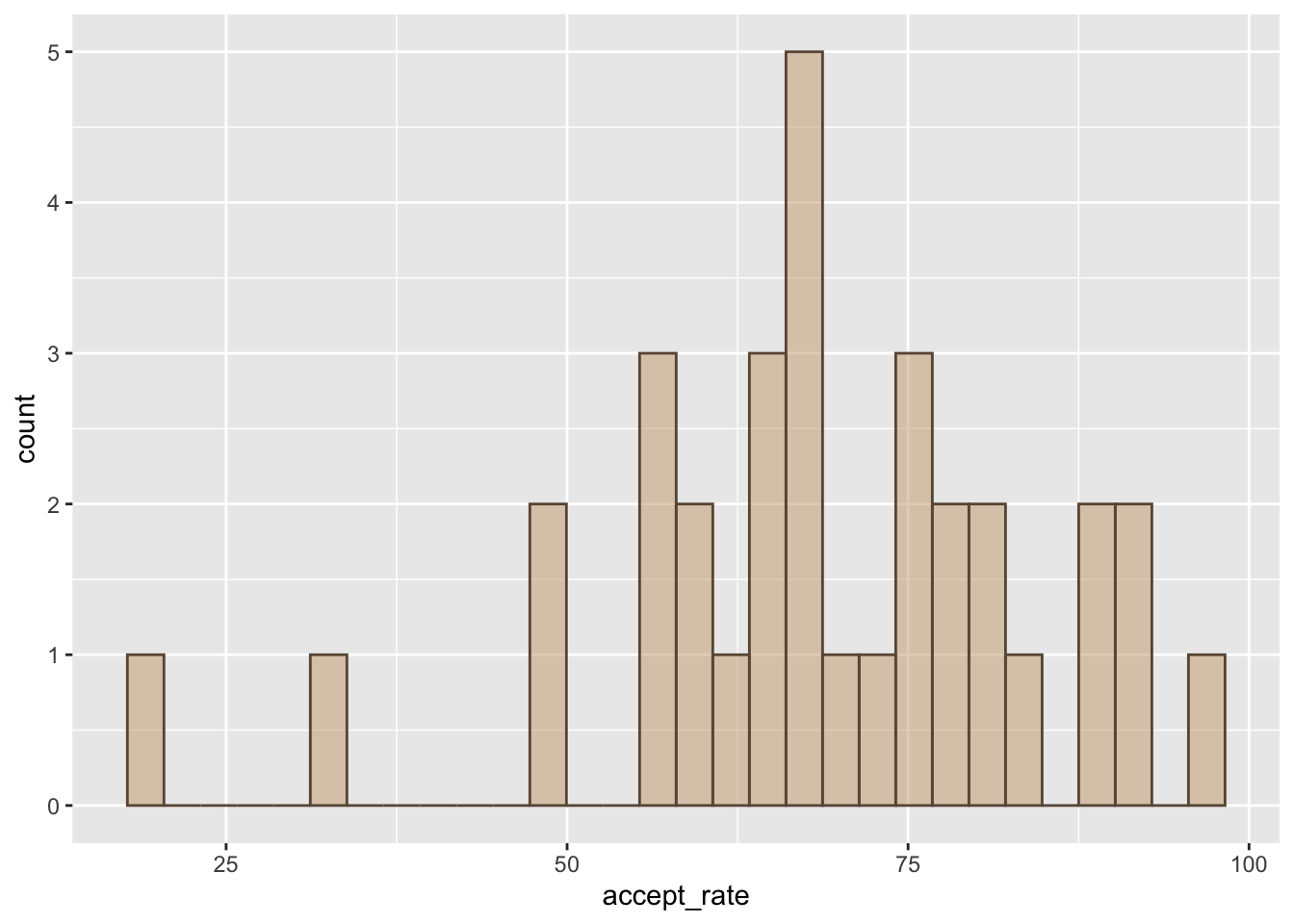
- Use the mn-colleges.csv data to create a density plot of the acceptance rates. Color the interior of the plot using #CBA67B and the border with #695645.
References
Newton, I. (1704). Opticks: Or, a treatise of the reflections, refractions, inflections and colours of light. Printed for Sam. Smith, and Benj. Walford.
Visible light encompasses wavelengths roughly between 380 and 750 nanometers (nm). Newton described this as a spectrum of light and divided the spectrum into seven named colors: red, orange, yellow, green, blue, indigo, and violet.↩︎
Our perception of color has since been augmented by Opponent Process Theory which describes how the brain processes those three signals later on in the visual system.↩︎
Because the different wavelengths for the three components essentially sum together to create a new wavelength, the RGB color model is sometimes referred to as an additive model.↩︎